Search this site

Showing posts with label List Processing. Show all posts

Sunday, May 20, 2012

How to debug the code in abap report ?

  1. Using Se38 to open the report , set break point as the screen below:


2. Press F8 to run report, it will show the Variant 1 screen on the right:
In this example is the internal table GT_MARA and work area GS_MARA.
You can view the value of the internal table and work area by double click the internal table GT_MARA and work area GS_mara

3. Here's the values in the internal table gt_mara when debugging.
There is 1 rows in this internal table and it has  two fields with values 1 and ABC:

4.For convenience to debug program,by clicking the icon repair on the top right screen(3) ,we could edit values in the internal table: change,insert,delete rows from internal table...

Tuesday, March 27, 2012

List processing example

*&---------------------------------------------------------------------*
*& Report Z_LIST_PROCESSING
*&
*&---------------------------------------------------------------------*

REPORT Z_LIST_PROCESSING .

*&---------------------------------------------------------------------*
* Declare global object and selection screen.
*&---------------------------------------------------------------------*
*-----------------------------------------------------------------------
* TYPE POOL
*-----------------------------------------------------------------------
TYPE-POOLS:
SLIS.
*----------------------------------------------------------------------*
* TABLES
*----------------------------------------------------------------------*
TABLES:MARA.
*----------------------------------------------------------------------*
* TYPES
*----------------------------------------------------------------------*
*Struct MARA
TYPES: BEGIN OF GTY_MARA,
MATNR TYPE MARA-MATNR,"MATERIAL NUMBER
MTART TYPE MARA-MTART,
END OF GTY_MARA.
*Struct MAKT
TYPES: BEGIN OF GTY_MAKT,
MATNR TYPE MAKT-MATNR,"MATERIAL NUMBER
MAKTX TYPE MAKT-MAKTX,
END OF GTY_MAKT.
*Struct OUTPUT
TYPES: BEGIN OF GTY_OUTPUT,
MATNR TYPE MARA-MATNR,"MATERIAL NUMBER
MTART TYPE MARA-MTART,"MATERIAL TYPE
MAKTX TYPE MAKT-MAKTX,"MATERIAL DES
END OF GTY_OUTPUT.
*----------------------------------------------------------------------*
* Internal table
*----------------------------------------------------------------------*
DATA: GT_OUTPUT TYPE STANDARD TABLE OF GTY_OUTPUT,
GT_MARA TYPE STANDARD TABLE OF GTY_MARA,
GT_MAKT TYPE STANDARD TABLE OF GTY_MAKT,
*----------------------------------------------------------------------*
* Work area
*----------------------------------------------------------------------*
GS_OUTPUT TYPE GTY_OUTPUT,
GS_MARA TYPE GTY_MARA,
GS_MAKT TYPE GTY_MAKT.
*----------------------------------------------------------------------*
* Selection screen
*----------------------------------------------------------------------*
SELECT-OPTIONS: S_ERDA FOR MARA-ERSDA default '20111017 ' OBLIGATORY.
PARAMETERS:
pa_lim_1 RADIOBUTTON GROUP lim ,"JOIN
pa_lim_2 RADIOBUTTON GROUP lim,"FOR ALL ENTRIES
*----------------------------------------------------------------------*
* INITIALIZATION.
*----------------------------------------------------------------------*
INITIALIZATION.
*----------------------------------------------------------------------*
* AT SELECTION-SCREEN
*----------------------------------------------------------------------*
AT SELECTION-SCREEN.
*----------------------------------------------------------------------*
* START-OF-SELECTION
*----------------------------------------------------------------------*
START-OF-SELECTION.
*Select data
IF PA_LIM_1 IS NOT INITIAL.
*Join
SELECT
M~MATNR
M~MTART
M2~MAKTX
INTO TABLE GT_OUTPUT
FROM
MARA AS M
JOIN MAKT AS M2 ON M~MATNR = M2~MATNR
WHERE M~ERSDA IN S_ERDA AND
M2~SPRAS = 'E'.
ELSE.
*For all entries
SELECT
MATNR
MTART
FROM MARA
INTO TABLE GT_MARA
WHERE ERSDA IN S_ERDA.
DELETE ADJACENT DUPLICATES FROM GT_MARA COMPARING MATNR.
IF GT_MARA IS NOT INITIAL.
SELECT
MATNR
MAKTX
FROM MAKT
INTO TABLE GT_MAKT
FOR ALL ENTRIES IN GT_MARA
WHERE MATNR = GT_MARA-MATNR AND SPRAS = 'E'.
ENDIF.
SORT GT_MAKT BY MATNR.
LOOP AT GT_MARA INTO GS_MARA.
CLEAR: GS_MAKT.
READ TABLE GT_MAKT BINARY SEARCH WITH KEY MATNR = GS_MARA-MATNR
INTO GS_MAKT.
GS_OUTPUT-MATNR = GS_MARA-MATNR.
GS_OUTPUT-MTART = GS_MARA-MTART.
GS_OUTPUT-MAKTX = GS_MAKT-MAKTX.
APPEND GS_OUTPUT TO GT_OUTPUT.
ENDLOOP.
ENDIF.
*----------------------------------------------------------------------*
* End-OF-SELECTION
*----------------------------------------------------------------------*
END-OF-SELECTION.
* Output data

LIST PROCESSING

* Struct
TYPES: BEGIN OF GTY_OUTPUT1,
MTART TYPE MARA-MTART,"MATERIAL TYPE
MATNR TYPE MARA-MATNR,"MATERIAL NUMBER
MAKTX TYPE MAKT-MAKTX,"MATERIAL DES
END OF GTY_OUTPUT1.
DATA: GT_OUTPUT1 TYPE STANDARD TABLE OF GTY_OUTPUT1,
GS_OUTPUT1 TYPE GTY_OUTPUT1.
LOOP AT GT_OUTPUT INTO GS_OUTPUT.
GS_OUTPUT1-MTART = GS_OUTPUT-MTART.
GS_OUTPUT1-MATNR = GS_OUTPUT-MATNR.
GS_OUTPUT1-MAKTX = GS_OUTPUT-MAKTX.
APPEND GS_OUTPUT1 TO GT_OUTPUT1.
ENDLOOP.

SORT GT_OUTPUT1 BY MTART MATNR.
LOOP AT GT_OUTPUT1 INTO GS_OUTPUT1.
AT FIRST.
WRITE: / 'AT FIRST'.
ENDAT.
AT NEW MTART.
WRITE: /.
WRITE: /10(15) 'MATERIAL TYPE:'.
WRITE: 26(10) GS_OUTPUT1-MTART.
WRITE: /1(15) 'Material number'.
WRITE: 17(20) 'Material description'.
ENDAT.
WRITE: /1(10) GS_OUTPUT1-MATNR.
WRITE: 17(20) GS_OUTPUT1-MAKTX.
AT END OF MTART.
WRITE: /.
ULINE 10(30).
ENDAT.
AT LAST.
WRITE: / 'AT last'.
ENDAT.
ENDLOOP.
ENDIF.

Selection screen:
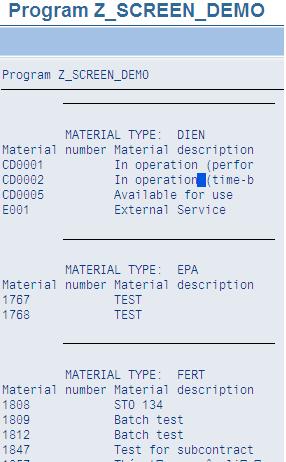
Here's the output:

Data Formatting and Control Level Processing

LOOP AT itab INTO ….
AT FIRST.
ENDAT.
AT NEW .
ENDAT.
AT END OF
ENDAT.
AT LAST.
ENDAT.
ENDLOOP.

Programming Data Retrieval

Programming Data Retrieval

INNER JOIN
OUTTER JOIN
FOR ALL ENTRIES
SELECT carrid connid fldate…
INTO TABLE itab_splight FROM SFLIGHT
FOR ALL ENTRIES IN itab_spfli
WHERE


Selection Screen

a)Generate

PARAMETERS:
[TYPE ] [DECIMALS ] [LIKE ] [MEMORY ID ]
[OBLIGATORY] [DEFAULT ] [LOWER CASE]
[VALUE CHECK]
[AS CHECKBOX]
[RADIOBUTTON GROUP ]

Selection-options
SELECT-OPTIONS: FOR
DEFAULT VALUE
DEFAULT TO
MEMORY ID
LOWER CASE
OBLIGATORY
NO-EXTENSION
NO INTERVALS
b)Design Selection Screen
SELECTION-SCREEN BEGIN OF BLOCK
WITH FRAME [TITLE ]

PARAMETERS :
NAME LIKE BKPF-BUKRS,
Rad1 RADIOBUTTON GROUP G1,
Rad2 RADIOBUTTON GROUP G1.

SELECT-OPTIONS:
CpCode FOR BKPF-BUKRS NO INTERVALS.

SELECTION-SCREEN END OF BLOCK

SELECTION-SCREEN BEGIN OF LINE
COMMENT Pos(len) [FOR FIELD ]
POSITION pos
SELECTION-SCREEN END OF LINE

SELECTION-SCREEN BEGIN OF LINE.

SELECTION-SCREEN COMMENT 10(10) Text-001.
PARAMETER : Name(10) TYPE c.
SELECTION-SCREEN COMMENT 40(10) Text-002 FOR FIELD Check.
PARAMETER : Check AS CHECKBOX.

SELECTION-SCREEN END OF LINE.


Outputting Data in Lists

a)Simple list

Example:

Output:


b)List formats
REPORT LINE-SIZE LINE-COUNT
LINE-SIZE LINE-COUNT
TOP-OF-PAGE event : generate page headersExample:

Ouput


—WRITE [AT] [/] ...
-Option:
—NO-ZERO.
—CURRENCY .
—UNIT .
—USING EDIT MARK .
—UNDER .
—LEFT-JUSTIFIED.
—CENTERED.
—RIGHT-JUSTIFIED.

SY-ULINE
Contains a horizontal line with length 255 that you can use when creating lists.
SY-VLINE
Contains a vertical line (|) that you can use when creating lists.
NO-ZERO If the contents of field are equal to zero, only spaces are
output.
CURRENCY Formats currency fields based on rules defined in table TCURX.
UNIT Formats quantity fields based on rules defined in table T0006.
USING EDIT MASK Outputs according to the formatting template.
UNDER The output begins at the column in which field was output.
LEFT-JUSTIFIED Left-justified output (default for types C, N, D, T, X).
CENTERED Centered output within the output length.
RIGHT-JUSTIFIED Right-justified output (standard for all number fields: I, P and F)


Techniques of List Processing

  1. Outputting Data in Lists
  2. Selection Screen
  3. Programming Data Retrieval
  4. Data Formatting and Control Level Processing
  5. Basic Techniques in Interactive Lists
  6. SAP Grid Control
  7. List processing example