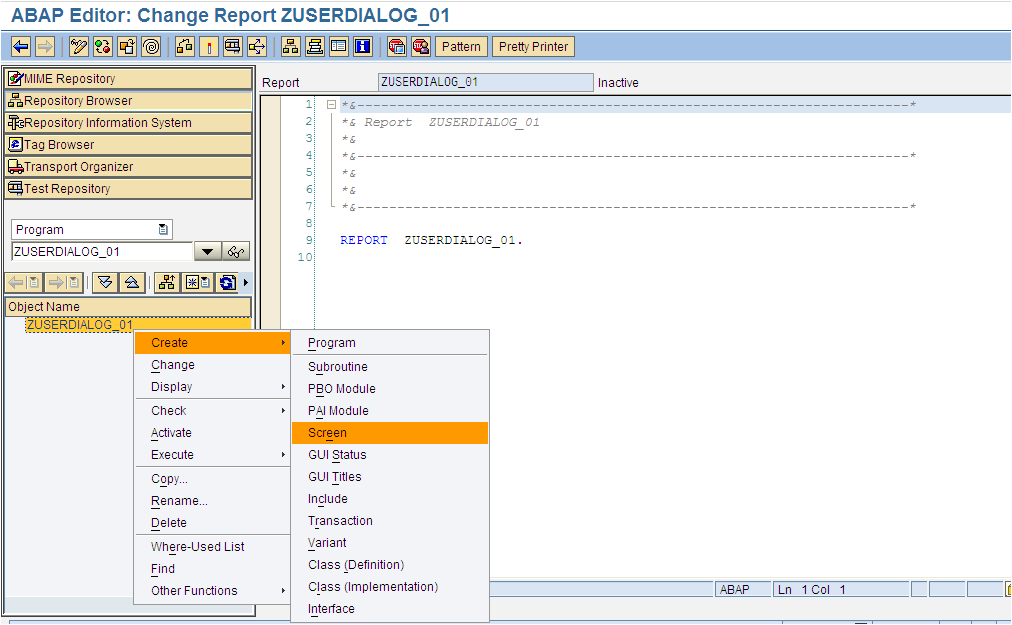
2.Add title code and description of title:
SAP Abap programming & SAP Modules SD,MM,HR,PP...
Search this site
Friday, April 26, 2013
Create title in module pool programming
2.Add title code and description of title:
Wednesday, April 24, 2013
Modify screen in module programming
Business requirement:
The screen as below :

Here the code of the module pool program:
Notice that,to set read only these text fields,first make them in the group MOD
After pressing change button the code as below will execute:
Monday, April 22, 2013
SAP books suggested
I am very interesting in SAP and like reading SAP books.
I have been working in SAP for more than 4 years,so I made this site to share my knowledge to everyone choosing SAP is the career path.
From my experience,these books as below could help you ,the newbies in SAP can get a basic knowledge to lay a first stable step in the SAP world.
1) Sams Teach Yourself ABAP/4 in 21 Days
The ideal book for a programmer who must get started in ABAP immediately, and does not want to know the complete story of how and why ABAP was originated. Provides all of the essential information that an ABAP programmer needs and provides it in a readable format. Provides examples that are real and practical not text-book based, like other ABAP programming books. The book also provides insight into the SAP certification process, although not actual coverage of certification because candidates must have two years of practical ABAP programming experience to even enroll in the certification courses!
*Some helpfull review I collected:
1.1) This is an excellent book, if you have some experience in IT, but are new to SAP and ABAP/4 programming. The author gives a short overview of the SAP system. He describes how client/server and database are implemented in SAP. The book shows you how to get around in the Workbench -- how to use the SAP menus and other online features to create, update, and test your code -- something that other ABAP/4 books lack. I found the step-by-step directions for writing code, creating tables, etc., very helpful. The book covers only reporting with ABAP/4 -- it doesn't cover dialog programming (programming for interactive screens), or SAPscript. But, for the subjects covered, I think it may be the best beginning book. The writing is clear, straighforward, and even has a sense of humor.
1.2) I found the book EXTREMELY heavy on data dictionaries and internal tables, but VERY light (read - non existing) on external file imports or exports. It didn't have a section on BDC's. Functions & parameters were at the very end of the book (2/21 days!). One of the things I found most frustrating was that the book never indicated the version of SAP it was running on. While not a deal breaker, screen cams were hard to follow because they didn't look anything like my 4.5B system at work! If you want to learn about data I/O & reporting, I would suggest spending your money on "Introduction to ABAP/4 - Programming for SAP" instead.
...
Saturday, December 15, 2012
Module pool programming: Create GUI Status example
Module pool programming: Example input,output field element
1. Go to SE80 , create program:

Third,create the button with the name CAL , fctCode CAL.
Double click to the screen 1000 ,it will show you the flow logic of the screen 1000.
It has two PROCESSES:
PROCESS BEFORE OUTPUT : In this proscess,you could set the initial values of the screen elements or do the initial logics.
PROCESS AFTER INPUT: In this proscess,you could get the value from the screen elements and do the needful.
Create the MOUDLEs in each PROCESS.
Here' code example.Notice that the name of variants in the flow logic must be same name with the name of screen elements:
REPORT ZUSERDIALOG_01.
DATA: A TYPE I,
B TYPE I,
RESULT type i.
CALL SCREEN 1000.
*&---------------------------------------------------------------------*
*& Module STATUS_1000 OUTPUT
*&---------------------------------------------------------------------*
* text
*----------------------------------------------------------------------*
MODULE STATUS_1000 OUTPUT.
* SET PF-STATUS 'xxxxxxxx'.
* SET TITLEBAR 'xxx'.
A = 1.
B = 1.
ENDMODULE. " STATUS_1000 OUTPUT
*&---------------------------------------------------------------------*
*& Module USER_COMMAND_1000 INPUT
*&---------------------------------------------------------------------*
* text
*----------------------------------------------------------------------*
MODULE USER_COMMAND_1000 INPUT.
IF sy-ucomm = 'CAL'.
RESULT = A + B.
ENDIF.
ENDMODULE. " USER_COMMAND_1000 INPUT
F8 to run program:
The result will show after pressing CAL button.
Sunday, May 20, 2012
How to debug the code in abap report ?
- Using Se38 to open the report , set break point as the screen below:
Monday, April 2, 2012
Abap query transaction
Sapscript example code in Abap
REPORT ZDEMO_SAPSCRIPT_PERFORM.
*----------------------------------------------------------------------
* TABLES: VBAP. TABLES: ITCPO. " optional for setting default print parameters PARAMETERS: FORM LIKE RSSCF-TDFORM DEFAULT 'YDEMO_PERFORM'. START-OF-SELECTION. ************************************************************************ * Open the SapScript Form with the "form" * ************************************************************************ CLEAR ITCPO . * itcpo-tddest = 'ZHTM'. ITCPO-TDIMMED = 'X'. ITCPO-TDDELETE = 'X'. ITCPO-TDNEWID = 'X'. CALL FUNCTION 'OPEN_FORM' EXPORTING FORM = FORM " name of form (SE71) OPTIONS = ITCPO EXCEPTIONS CANCELED = 1 DEVICE = 2 FORM = 3 OPTIONS = 4 UNCLOSED = 5 MAIL_OPTIONS = 6 OTHERS = 7. ************************************************************************ ** Execute the element "HELLO" in window MAIN * - Nothing happens if /E HELLO is not declared in MAIN ************************************************************************ CALL FUNCTION 'WRITE_FORM' EXPORTING ELEMENT = 'HELLO' "execute element /E HELLO * FUNCTION = 'SET' TYPE = 'BODY' "normal output EXCEPTIONS ELEMENT = 1 FUNCTION = 2 TYPE = 3 UNOPENED = 4 UNSTARTED = 5 WINDOW = 6 BAD_PAGEFORMAT_FOR_PRINT = 7 OTHERS = 8. ************************************************************************ * Close the current SapScript Form ************************************************************************CALL FUNCTION 'CLOSE_FORM'EXCEPTIONSUNOPENED = 1BAD_PAGEFORMAT_FOR_PRINT = 2OTHERS = 3.FORM CALLED_FROM_SAPSCRIPT TABLES IN_TAB STRUCTURE ITCSY OUT_TAB STRUCTURE ITCSY.DATA: TABIX LIKE SY-TABIX.TABLES: KNA1.BREAK-POINT.READ TABLE IN_TAB WITH KEY NAME = 'KUNNR'.KNA1-KUNNR = IN_TAB-VALUE.READ TABLE OUT_TAB WITH KEY NAME = 'NAME'.TABIX = SY-TABIX.OUT_TAB-NAME = 'NAME'.SELECT SINGLE * FROM KNA1 WHERE KUNNR EQ KNA1-KUNNR.IF SY-SUBRC EQ 0.CONCATENATE KNA1-NAME1 KNA1-ORT01 INTO OUT_TAB-VALUE SEPARATED BY SPACE.ELSE.CONCATENATE KNA1-KUNNR 'not found' INTO OUT_TAB-VALUE SEPARATED BY SPACE.ENDIF.MODIFY OUT_TAB INDEX TABIX.ENDFORM.
SapScript Coding
....+....1....+....2....+....3....+....4....+....5....+....6....+....7.. /E PERFORM_ABAP /: PERFORM CALLED_FROM_SAPSCRIPT IN PROGRAM zsapscriptexits /: USING &invar1& /: USING &invar2& ... /: CHANGING &outvar1& /: CHANGING &outvar2& ... /: ENDPERFORM
(Refer from site idocs.de)
Sunday, April 1, 2012
How to debug Sapscript ABAP
- Go to SE71 transaction.
- Click on Utilities menu -> Activate Debugger.
Sapscript tcode
SE71 - SAPscript form Basis - SAPscript
SE73 - SAPscript Font Maintenance Basis - SAPscript
SE75 - SAPscript Settings Basis - SAPscript
SE72 - SAPscript Styles Basis - SAPscript
SE76 - SAPscript: Form Translation Basis - SAPscript
SE74 - SAPscript format conversion Basis - SAPscript
SE77 - SAPscript Styles Translation Basis - SAPscript
PBAT - Choose SAPscript or WinWord Personnel Mgmt - Recruitment
J2I7 - CIN: SAPScript reporting customizing FI - Localization
PM20 - Statements with SAPscript Payroll - Reuse Services for Country Development
BRFU01 - BRF: Compare SAPscript Texts Cross Application - Business Rule Framework
Sapscript command abap
Command | Use |
New-page | Prints the text following this command on a new page (when a page name is specified then that page is taken as the next page) |
Protect ….. Endprotect | This acts like a conditional page break. Putting the text within this command prevents the breaking of the text across multiple pages. If there is not enough space for the entire paragraph to be printed in the space remaining on the page, then the entire paragraph is printed on the next page |
Box Position Size | The BOX command draws a box as per the specifications. The x y co-ordinates are for the upper left corner relative to the values in the position command. POSITION command is used to set the x y co-ordinates with respect to the start position of the window. SIZE command is used to specify the size of the box that we need to draw. Varying these parameters also helps to draw a line instead of a box. |
IF ….. END IF | This allows the conditional printing of the text on the output document. The various conditional operators that can be used are as follows = EQ Equal to <> > GT Greater than <= LE Less than or equal to >= GE greater than or equal to <> NE not equal to The logical operators that can be used are as follows NOT, AND, OR |
Saturday, March 31, 2012
Create index in table sap ?
Get date time in abap sap ?
SY-DATLO
User’s local date, for example 19981129, 19990628, …
SY-DATUM
Current application server date, for example 19981130, 19990627, …
SY-DAYST
X during summertime, otherwise space.
SY-FDAYW
Factory calendar day of the week: Monday = 1 … Friday = 5.
SY-TIMLO
Friday, March 30, 2012
Way to find a badi in abap sap
There are several ways to find BADIs in the program.
1. Set a beark-point in method ‘CL_EXITHANDLER=>GET_INSTANCE’. Because old BAID technology will always call this method to get the BADI instance.
2. Search string ‘CL_EXITHANDLER=>GET_INSTANCE’ in the program. This drawback of this method is that the program may call another program in the runtime. In this case, you will be able to find the BADI in another program.
3. You can also go the t-code SPRO, you can also find plenty of BADIs in the related area.
4. You can also find the BADI call using ST05. Below is the steps:
- Go to ST05, then choose ‘table buffer trace’ and activate the trace.
- Run the t-code from where you want to find the BADI.
- Deactive the trace and then display trace.
- using selection criteria object ‘V_EXT_IMP’ and ‘V_EXT_ACT’ and then you can get called BADI list.
This analyzing technique is based on the fact that all BAdIs are registrated in SAP database tables. So for each BAdI call these database tables will be accessed. The BAdI database tables are SXS_INTER, SXC_EXIT, SXC_CLASS and SXC_ATTR. These tables are always accessed by the views V_EXT_IMP and V_EXT_ACT. So these two ABAP views (T: SE11) will be the basis for the trace.
Example ALV in abap SAP
*& Report Z_SCREEN_DEMO
*&
*&---------------------------------------------------------------------*
*&
*&
*&---------------------------------------------------------------------*
REPORT Z_SCREEN_DEMO.
*&---------------------------------------------------------------------*
* Declare global object and selection screen.
*&---------------------------------------------------------------------*
*-----------------------------------------------------------------------
* TYPE POOL
*-----------------------------------------------------------------------
TYPE-POOLS:
SLIS.
*----------------------------------------------------------------------*
* TABLES
*----------------------------------------------------------------------*
TABLES:MARA.
*----------------------------------------------------------------------*
* TYPES
*----------------------------------------------------------------------*
*Struct MARA
TYPES: BEGIN OF GTY_MARA,
MATNR TYPE MARA-MATNR,"MATERIAL NUMBER
MTART TYPE MARA-MTART,
END OF GTY_MARA.
*Struct MAKT
TYPES: BEGIN OF GTY_MAKT,
MATNR TYPE MAKT-MATNR,"MATERIAL NUMBER
MAKTX TYPE MAKT-MAKTX,
END OF GTY_MAKT.
*Struct OUTPUT
TYPES: BEGIN OF GTY_OUTPUT,
MATNR TYPE MARA-MATNR,"MATERIAL NUMBER
MTART TYPE MARA-MTART,"MATERIAL TYPE
MAKTX TYPE MAKT-MAKTX,"MATERIAL DES
END OF GTY_OUTPUT.
*----------------------------------------------------------------------*
* Internal table
*----------------------------------------------------------------------*
DATA: GT_OUTPUT TYPE STANDARD TABLE OF GTY_OUTPUT,
GT_MARA TYPE STANDARD TABLE OF GTY_MARA,
GT_MAKT TYPE STANDARD TABLE OF GTY_MAKT,
*----------------------------------------------------------------------*
* Work area
*----------------------------------------------------------------------*
GS_OUTPUT TYPE GTY_OUTPUT,
GS_MARA TYPE GTY_MARA,
GS_MAKT TYPE GTY_MAKT.
*----------------------------------------------------------------------*
* Selection screen
*----------------------------------------------------------------------*
SELECT-OPTIONS: S_ERDA FOR MARA-ERSDA default '20110916 ' OBLIGATORY.
PARAMETERS:
pa_lim_1 RADIOBUTTON GROUP lim ,"JOIN
pa_lim_2 RADIOBUTTON GROUP lim,"FOR ALL ENTRIES
*----------------------------------------------------------------------*
* INITIALIZATION.
*----------------------------------------------------------------------*
INITIALIZATION.
*----------------------------------------------------------------------*
* AT SELECTION-SCREEN
*----------------------------------------------------------------------*
AT SELECTION-SCREEN.
*----------------------------------------------------------------------*
* START-OF-SELECTION
*----------------------------------------------------------------------*
START-OF-SELECTION.
*Select data
IF PA_LIM_1 IS NOT INITIAL.
*Join
SELECT
M~MATNR
M~MTART
M2~MAKTX
INTO TABLE GT_OUTPUT
FROM
MARA AS M
JOIN MAKT AS M2 ON M~MATNR = M2~MATNR
WHERE M~ERSDA IN S_ERDA AND
M2~SPRAS = 'E'.
ELSE.
*For all entries
SELECT
MATNR
MTART
FROM MARA
INTO TABLE GT_MARA
WHERE ERSDA IN S_ERDA.
DELETE ADJACENT DUPLICATES FROM GT_MARA COMPARING MATNR.
IF GT_MARA IS NOT INITIAL.
SELECT
MATNR
MAKTX
FROM MAKT
INTO TABLE GT_MAKT
FOR ALL ENTRIES IN GT_MARA
WHERE MATNR = GT_MARA-MATNR AND SPRAS = 'E'.
ENDIF.
SORT GT_MAKT BY MATNR.
LOOP AT GT_MARA INTO GS_MARA.
CLEAR: GS_MAKT.
READ TABLE GT_MAKT BINARY SEARCH WITH KEY MATNR = GS_MARA-MATNR
INTO GS_MAKT.
GS_OUTPUT-MATNR = GS_MARA-MATNR.
GS_OUTPUT-MTART = GS_MARA-MTART.
GS_OUTPUT-MAKTX = GS_MAKT-MAKTX.
APPEND GS_OUTPUT TO GT_OUTPUT.
ENDLOOP.
ENDIF.
*----------------------------------------------------------------------*
* End-OF-SELECTION
*----------------------------------------------------------------------*
END-OF-SELECTION.
* Output data
* ALV
data: LS_FIELDCAT type slis_fieldcat_alv.
data: GT_FIELDCAT type slis_t_fieldcat_alv.
PERFORM CREATE_FIELD_CAT.
*&---------------------------------------------------------------------*
*& Form CREATE_FIELD_CAT
*&---------------------------------------------------------------------*
* Create field catalogies
*----------------------------------------------------------------------*
FORM CREATE_FIELD_CAT .
call function 'REUSE_ALV_FIELDCATALOG_MERGE'
exporting
i_internal_tabname = 'GT_OUTPUT'
i_structure_name = 'ZOUTPUT'
changing
ct_fieldcat = GT_FIELDCAT.
ENDFORM. " CREATE_FIELD_CAT
*&---------------------------------------------------------------------*
*& Form GRID_DISPLAY
*&---------------------------------------------------------------------*
* Grid Display
*----------------------------------------------------------------------*
FORM GRID_DISPLAY .
CALL FUNCTION 'REUSE_ALV_GRID_DISPLAY'
EXPORTING
I_CALLBACK_PROGRAM = 'ZSCREEN_DEMO1'
* I_CALLBACK_USER_COMMAND = 'USER_COMMAND'
I_CALLBACK_TOP_OF_PAGE = 'FRM_TOP_OF_PAGE'
IT_FIELDCAT = GT_FIELDCAT
I_SAVE = 'X'
* IS_VARIANT = G_VARIANT
TABLES
T_OUTTAB = GT_OUTPUT
EXCEPTIONS
PROGRAM_ERROR = 1
OTHERS = 2.
IF SY-SUBRC <> 0.
* MESSAGE ID SY-MSGID TYPE SY-MSGTY NUMBER SY-MSGNO
* WITH SY-MSGV1 SY-MSGV2 SY-MSGV3 SY-MSGV4.
ENDIF.
ENDFORM. " GRID_DISPLAY
*&---------------------------------------------------------------------*
*& Form Top of page
*&---------------------------------------------------------------------*
* Top of page
*----------------------------------------------------------------------*
FORM FRM_TOP_OF_PAGE.
*ALV Header declarations
DATA: T_HEADER TYPE SLIS_T_LISTHEADER,
WA_HEADER TYPE SLIS_LISTHEADER.
* Title
WA_HEADER-TYP = 'H'.
WA_HEADER-INFO = 'ALV Demo'.
APPEND WA_HEADER TO T_HEADER.
CLEAR WA_HEADER.
* Date
WA_HEADER-TYP = 'S'.
WA_HEADER-KEY = 'Date: '.
CONCATENATE SY-DATUM+6(2) '.'
SY-DATUM+4(2) '.'
SY-DATUM(4) INTO WA_HEADER-INFO. "todays date
APPEND WA_HEADER TO T_HEADER.
CLEAR: WA_HEADER.
CALL FUNCTION 'REUSE_ALV_COMMENTARY_WRITE'
EXPORTING
IT_LIST_COMMENTARY = T_HEADER.
ENDFORM.